

AI, CAD/CAM, and digital workflows were supposed to make the dental lab business easier.
And in some ways, they did.
But if you’re a lab owner or operator, you’re still feeling the same pressure every week: empty technician chairs, fewer qualified candidates, and salaries that stretch the P&L—while case volume keeps coming.
The whitepaper makes one uncomfortable point clear:
This isn’t temporary. It’s structural.
And that means the labs that “wait it out” will get squeezed—while the labs that respond strategically will pull ahead for the next decade.
Most industries can solve labor shortages with time: more students, more training programs, more entrants.
Dental labs can’t—because the training pipeline has collapsed.
The report cites a 75%+ collapse in CODA-accredited dental lab technician programs: from 56 programs in 1992 to 13–14 today.
Those remaining programs produce about 300 graduates per year—against approximately 7,700 annual openings.
That’s not a shortage. That’s a math problem.
And it’s compounding.
Even if the pipeline were stable (it isn’t), retirements are hitting now. The report highlights survey evidence that 49% of lab professionals plan to retire within five years.
So the staffing squeeze you feel today isn’t the peak—it’s the beginning of a longer reshaping of the industry.
Here’s the part that feels painfully familiar once you see it:
In a fully staffed lab, non-production tasks get absorbed across enough people to stay manageable.
In a labor-constrained lab, the same admin load collapses onto fewer people—stealing the hours you thought were production capacity.
The report calls out the usual suspects:
In its example, a 7-person lab can burn ~10–12 hours/day on non-production work—creating queues before production even begins.
That’s the hidden reason many labs operate at ~65–70% effective capacity utilization even when the team is working hard.
The damage shows up in three places—easy to underestimate until you feel them every day:
Cases don’t move because production is slow—they move slowly because upstream admin and handoffs bottleneck first.
LaborShortage
The report cites an industry remake rate around ~4%, and notes that 82% of remakes originate from errors before production (bad scans, incomplete prescriptions, missing shade info).
Each remake costs real money (materials + labor) and damages dentist trust.
The report’s thesis is blunt: labs that solve the shortage with systems—not headcount—will inherit volume competitors can’t handle.
LaborShortage
The whitepaper’s competitive takeaway is not “try harder to hire.” It’s this:
Redirect skilled human time away from work a machine can do—toward work only skilled technicians can do.
It recommends starting with an audit: for one week, track hours spent on case entry/Rx parsing, portal checking, inbound/outbound communication, QC, and remake rework. Many labs discover non-production overhead is 30–40% of total labor hours—far higher than expected.
From there, the “system moves” become obvious:
Before you buy another tool—or add another workflow to an already overloaded team—use this filter:
This post is the high-level summary. The full report breaks down the labor data, the pipeline collapse, the non-production time trap, and the operating framework labs are using to grow in scarcity.
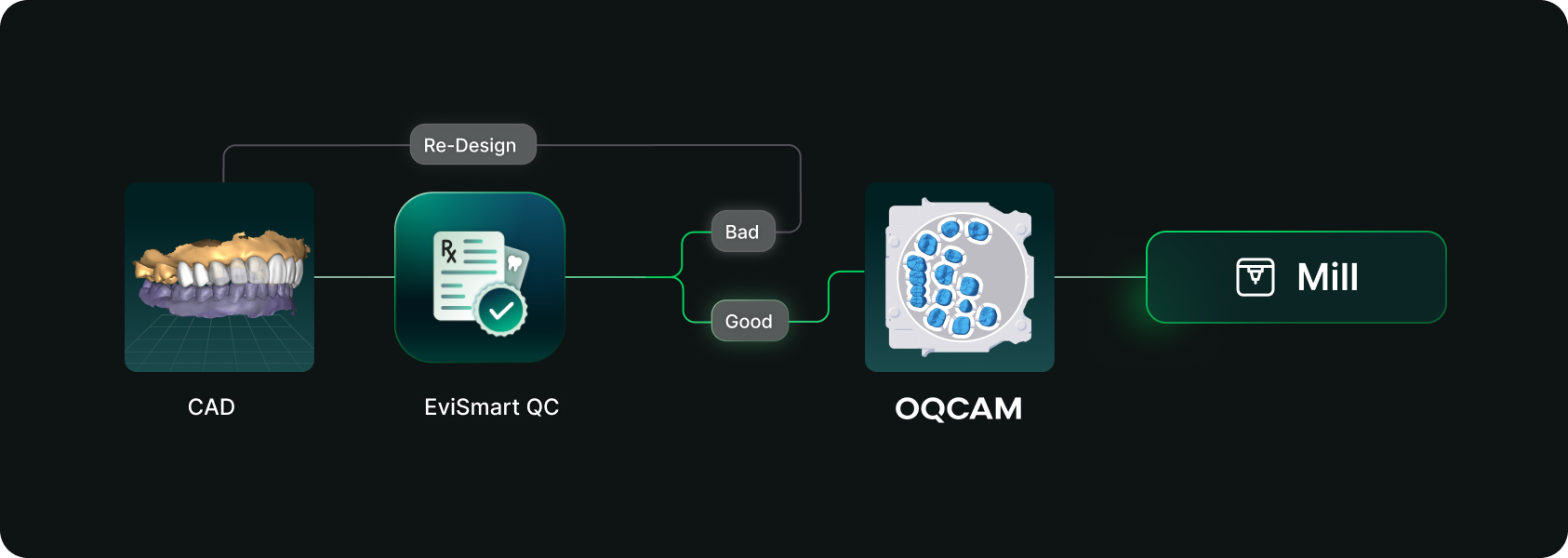
Designs you order from EviSmart arrive in your Oqcam already formatted. Named the way your nesting rules expect, with shade and material attached, and pointed at the machine that case belongs on.
The routing is decided per case. An implant case sends the crown to the mill and puck you cut implant crowns on, and the model to the printer you print models on. Different case types, different machines, chosen automatically rather than by a tech working through a dropdown for every file.
The trigger is QC approval. EviSmart designs your cases your way. The same team works on all your cases and learns what a good case looks like to you. Once your case passes our QC, it triggers a greenlight to send the design directly into your Oqcam account in under a minute.
Once the file arrives in your Oqcam, all your CAD/CAM technicians can review the nested design before starting the mill. That final QC step does not change and is not meant to.
Setup is one session. We connect your Oqcam account and agree where each of your products should go, using the routes and materials you have already built there. Nothing new to create, and you only revisit it if something changes.
Automatic sending only works if you trust what is being sent. Once a case is nested it gets cut, and a design that was not right is wasted material.
You choose what flows. During setup we map only the case types you want moving on their own. Anything unmapped never sends. It waits for you exactly as it does today.
Most labs start narrow. Bread and butter work first, night guards and posterior single units, then widen once they have watched it run for a few weeks. The lab that has been live longest started exactly there and has added case types since.
Your approval stays. This removes the file shuffling between design and CAM. It does not remove your eyes from the build.
For labs outsourcing design work the math gets compelling somewhere north of 30 cases a day into nesting, because that is where the handoff stops being an annoyance and starts being a role.
Not touchless design. Touchless handoff. Every step in that chain that requires judgment should keep requiring judgment, and every step that never did should stop requiring a person.
Nesting requires judgment. Confirming a build requires judgment. Renaming a file so software can read it does not, and never did. It was a workaround that quietly became somebody's job.
Nobody pays you to rename files.




