

There's a number that rarely appears in a dental lab's business plan, but quietly shapes almost every hiring decision the owner makes: 50.
That's the full-time equivalent employee count at which the Affordable Care Act classifies your business as an Applicable Large Employer, triggering a set of obligations that can cost your lab $230,000 to $460,000 or more every single year.
For an industry already navigating compressed margins, a technician shortage, and rising material costs, this isn't just a compliance issue. It's a structural constraint on growth. And most lab owners don't fully see it until they're already standing at the edge.
The ACA threshold is binary. The moment you cross 50 full-time equivalents, the rules change completely, affecting not just employees above that number but your entire workforce.
For a lab that grows from 48 to 55 employees, that means mandatory health coverage, IRS reporting requirements, HR administration overhead, and penalty exposure that together can add $605,000 to $874,000 in total loaded cost for just 7 additional hires. At a 15% EBITDA margin, you'd need $4M to $5.8M in new revenue just to break even on that staffing decision.
For most mid-sized labs, that math simply doesn't work. And yet many owners don't realize they're approaching the threshold until they're already in the middle of a hiring cycle.
Dental labs have always faced workforce constraints, but the combination of rising wages, a shrinking pool of trained technicians, and ACA compliance costs is creating a new kind of pressure. Growing headcount isn't just expensive. In some cases, it's actively destructive to the financial structure of the business.
That's why the labs that are scaling fastest aren't always the ones hiring most aggressively. They're the ones that figured out how to grow output without growing headcount.
Labs approaching the 50-employee threshold have three realistic options.
The first is to absorb the cost and cross the cliff. That means taking on the full ACA obligations and building the revenue base to support them. Some labs do this successfully. Most find that the margin drag slows reinvestment and makes future growth harder.
The second is to deliberately cap headcount below 50. This works as a short-term strategy, but it also caps growth. Labs in this position often find themselves turning away cases, extending turnaround times, or burning out existing staff. None of which is a sustainable path.
The third path is to grow output without growing headcount, through workflow automation, AI-assisted design, and operational restructuring that lets the same number of people do significantly more.
The data increasingly favors the third path. Automated labs generating $5M in revenue employ 31 to 42 people on average. Traditional labs at the same revenue level employ 63 to 83. That's not a small difference. It's the difference between a business that has room to grow and one that's structurally stuck.
That headcount gap compounds over time. Over a five-year period, the automation-first lab builds a $2.1M cumulative margin advantage over a comparable hiring-first lab. That advantage comes not from revenue differences, but from avoided compliance costs, lower labor overhead, and the ability to reinvest savings into capacity rather than insurance premiums.
The workflows that drive this are more automatable than most lab owners expect. At a 50-case-per-day lab, the tasks that can be handled through automation today represent 23 to 34 hours of manual labor, equivalent to 2.9 to 4.15 full-time employees and $160,000 to $270,000 in annual savings. And that's before accounting for the ACA obligations avoided by staying under the threshold.
If your lab is currently between 35 and 55 employees, the decisions you make in the next 12 to 24 months will significantly shape your cost structure for the next five years. The cliff isn't a future problem. For many labs, it's a present one.
The good news is that the path forward is increasingly well-documented. The benchmarks exist. The technology is ready. The financial models are clear.
The full report goes deeper, with a complete workflow automation map, a 5-year financial model, and a self-assessment framework to help you determine exactly where your lab stands today.
Get the financial models, benchmarks, and decision framework. No fluff, just the numbers dental lab owners need.
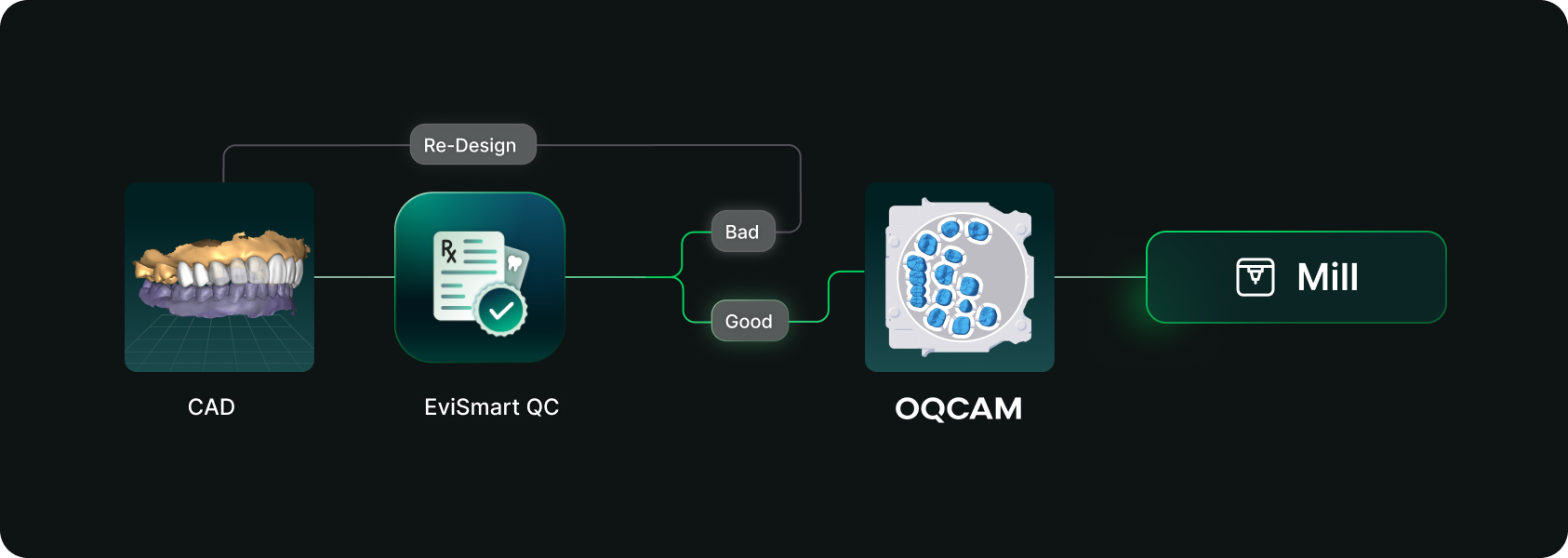
Designs you order from EviSmart arrive in your Oqcam already formatted. Named the way your nesting rules expect, with shade and material attached, and pointed at the machine that case belongs on.
The routing is decided per case. An implant case sends the crown to the mill and puck you cut implant crowns on, and the model to the printer you print models on. Different case types, different machines, chosen automatically rather than by a tech working through a dropdown for every file.
The trigger is QC approval. EviSmart designs your cases your way. The same team works on all your cases and learns what a good case looks like to you. Once your case passes our QC, it triggers a greenlight to send the design directly into your Oqcam account in under a minute.
Once the file arrives in your Oqcam, all your CAD/CAM technicians can review the nested design before starting the mill. That final QC step does not change and is not meant to.
Setup is one session. We connect your Oqcam account and agree where each of your products should go, using the routes and materials you have already built there. Nothing new to create, and you only revisit it if something changes.
Automatic sending only works if you trust what is being sent. Once a case is nested it gets cut, and a design that was not right is wasted material.
You choose what flows. During setup we map only the case types you want moving on their own. Anything unmapped never sends. It waits for you exactly as it does today.
Most labs start narrow. Bread and butter work first, night guards and posterior single units, then widen once they have watched it run for a few weeks. The lab that has been live longest started exactly there and has added case types since.
Your approval stays. This removes the file shuffling between design and CAM. It does not remove your eyes from the build.
For labs outsourcing design work the math gets compelling somewhere north of 30 cases a day into nesting, because that is where the handoff stops being an annoyance and starts being a role.
Not touchless design. Touchless handoff. Every step in that chain that requires judgment should keep requiring judgment, and every step that never did should stop requiring a person.
Nesting requires judgment. Confirming a build requires judgment. Renaming a file so software can read it does not, and never did. It was a workaround that quietly became somebody's job.
Nobody pays you to rename files.




