
Most labs don’t start the day with production.
They start with browsers.
Log into iTero. Download. Save.
Log into 3Shape. Download. Save.
Log into Medit. Download. Save.
Then open your LMS and type the same patient details again and again.
That’s not a workflow problem. It’s a sanity problem.
The report lays out a familiar timeline: by the time the lab finishes intake admin for ~25 cases, 3.5 hours are gone before any real production begins.
And that’s only the visible cost.
When intake stays manual, you pay in multiple currencies:
And as the report points out: the worst cost is the one that doesn’t show up in a spreadsheet—losing a client because a case was late due to a missed download.
Portal fatigue happens because labs try to scale intake with human effort. The alternative is to centralize intake into one system that checks every portal, downloads every case, and populates work orders automatically.
That’s the Universal Inbox: one connection replaces the daily rotation of 8–12 portals.
Link credentials for all portals (iTero, 3Shape, Medit, Carestream, CEREC, etc.). One-time setup.
The system checks portals on a cadence (e.g., every 15 minutes) and downloads new cases automatically.
Patient name, tooth numbers, shade, material preference, doctor instructions, pulled from scan/Rx files without re-typing.
Cases appear populated and ready to route. Your team reviews and approves, they don’t do repetitive entry.
Every lab has that one person who knows all the logins, rules, and preferences. When they’re out, the lab slows down or stops.
Automated intake removes that single point of failure. The system knows the logins. The system doesn’t take sick days.
And when intake runs overnight, the morning changes: the report describes 2.5 hours recovered every day, shifting the day’s start from administration to production.
list portals, connect credentials, verify connections
map doctor preferences and routing logic, notifications
parallel test vs manual process, verify accuracy, go live
This post is a high-level overview. The full PDF includes the full cost breakdown, rollout checklist, and workflow details.
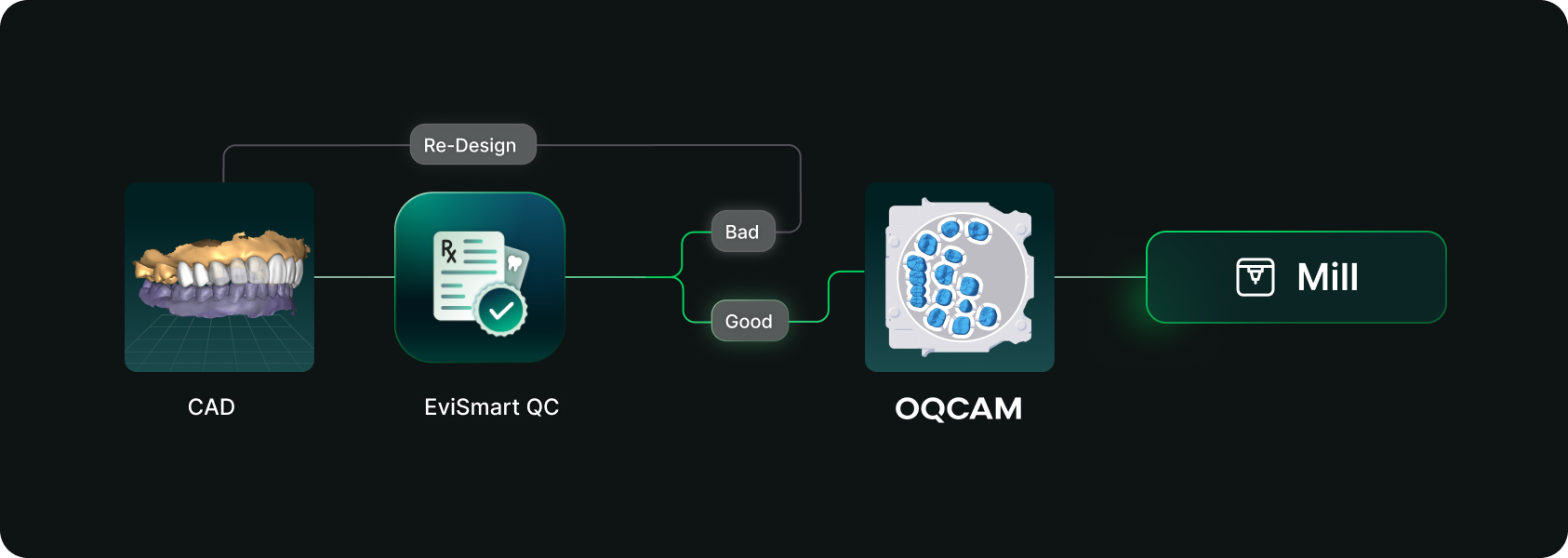
Designs you order from EviSmart arrive in your Oqcam already formatted. Named the way your nesting rules expect, with shade and material attached, and pointed at the machine that case belongs on.
The routing is decided per case. An implant case sends the crown to the mill and puck you cut implant crowns on, and the model to the printer you print models on. Different case types, different machines, chosen automatically rather than by a tech working through a dropdown for every file.
The trigger is QC approval. EviSmart designs your cases your way. The same team works on all your cases and learns what a good case looks like to you. Once your case passes our QC, it triggers a greenlight to send the design directly into your Oqcam account in under a minute.
Once the file arrives in your Oqcam, all your CAD/CAM technicians can review the nested design before starting the mill. That final QC step does not change and is not meant to.
Setup is one session. We connect your Oqcam account and agree where each of your products should go, using the routes and materials you have already built there. Nothing new to create, and you only revisit it if something changes.
Automatic sending only works if you trust what is being sent. Once a case is nested it gets cut, and a design that was not right is wasted material.
You choose what flows. During setup we map only the case types you want moving on their own. Anything unmapped never sends. It waits for you exactly as it does today.
Most labs start narrow. Bread and butter work first, night guards and posterior single units, then widen once they have watched it run for a few weeks. The lab that has been live longest started exactly there and has added case types since.
Your approval stays. This removes the file shuffling between design and CAM. It does not remove your eyes from the build.
For labs outsourcing design work the math gets compelling somewhere north of 30 cases a day into nesting, because that is where the handoff stops being an annoyance and starts being a role.
Not touchless design. Touchless handoff. Every step in that chain that requires judgment should keep requiring judgment, and every step that never did should stop requiring a person.
Nesting requires judgment. Confirming a build requires judgment. Renaming a file so software can read it does not, and never did. It was a workaround that quietly became somebody's job.
Nobody pays you to rename files.




