

What if your dental lab could take on significantly more cases—without hiring a single new employee? With the right strategies, it’s possible. Smart scaling is about increasing capacity by improving workflows, leveraging automation, and empowering your existing team. In this article, we’ll share five proven strategies to increase lab efficiency, reduce overhead, and boost profitability—all while keeping your payroll steady.
Identify bottlenecks in every step of your process, from case intake to shipping. Standardizing workflows eliminates wasted time and prevents errors.
Your technicians should focus on production, not paperwork. Automation tools can handle repetitive admin tasks faster and more accurately.
Pro tip: Look for tools that integrate directly into your lab management system to minimize manual work.
A cross-trained team is more adaptable during busy periods.
This flexibility means you’re never stuck waiting for “the one person” who knows how to do a task. It also improves employee satisfaction by expanding their skills.
Group similar tasks together to minimize setup time and boost output.
These lean practices can increase throughput by 10–20% without any added cost.
Instead of expanding payroll for short-term demand, consider flexible options.
This keeps fixed costs steady while giving you on-demand capacity when you need it most.
Scaling your dental lab doesn’t have to mean expanding your payroll. By combining workflow standardization, smart use of automation, cross-training, lean scheduling, and surge strategies, labs can increase weekly case output while maintaining the same headcount.
Not only will your lab handle more cases, but your team will also enjoy a more organized, less stressful work environment.
Want to see how automation tools can unlock hidden capacity in your lab? Learn More
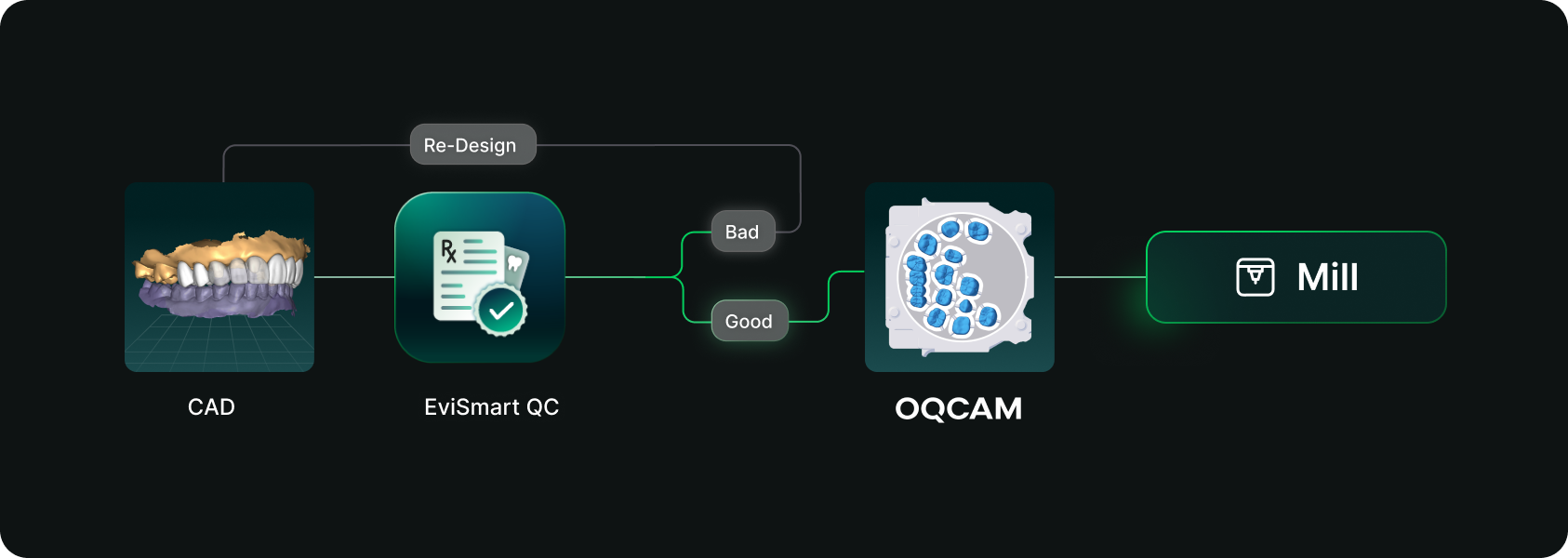
Designs you order from EviSmart arrive in your Oqcam already formatted. Named the way your nesting rules expect, with shade and material attached, and pointed at the machine that case belongs on.
The routing is decided per case. An implant case sends the crown to the mill and puck you cut implant crowns on, and the model to the printer you print models on. Different case types, different machines, chosen automatically rather than by a tech working through a dropdown for every file.
The trigger is QC approval. EviSmart designs your cases your way. The same team works on all your cases and learns what a good case looks like to you. Once your case passes our QC, it triggers a greenlight to send the design directly into your Oqcam account in under a minute.
Once the file arrives in your Oqcam, all your CAD/CAM technicians can review the nested design before starting the mill. That final QC step does not change and is not meant to.
Setup is one session. We connect your Oqcam account and agree where each of your products should go, using the routes and materials you have already built there. Nothing new to create, and you only revisit it if something changes.
Automatic sending only works if you trust what is being sent. Once a case is nested it gets cut, and a design that was not right is wasted material.
You choose what flows. During setup we map only the case types you want moving on their own. Anything unmapped never sends. It waits for you exactly as it does today.
Most labs start narrow. Bread and butter work first, night guards and posterior single units, then widen once they have watched it run for a few weeks. The lab that has been live longest started exactly there and has added case types since.
Your approval stays. This removes the file shuffling between design and CAM. It does not remove your eyes from the build.
For labs outsourcing design work the math gets compelling somewhere north of 30 cases a day into nesting, because that is where the handoff stops being an annoyance and starts being a role.
Not touchless design. Touchless handoff. Every step in that chain that requires judgment should keep requiring judgment, and every step that never did should stop requiring a person.
Nesting requires judgment. Confirming a build requires judgment. Renaming a file so software can read it does not, and never did. It was a workaround that quietly became somebody's job.
Nobody pays you to rename files.


