

In 2022, roughly 67% of all crowns & bridge restorations were fabricated using digital technology, with over one third of dentists sending intraoral scans to their lab. LMT Survey
Digital dentists are no longer “nice to have” clients—they’re an essential market segment for every lab. They expect speed, clarity, and frictionless workflows when they send you case files.
If you run a lab, you know just how much depends on every case. But here’s what many labs are discovering: digital dentists don’t leave because of price alone. They leave because their experience is too unpredictable. Scan files go missing. RXs are incomplete. Case intake feels messy. And trust, once lost, is hard to win back.
Here's why this happens, how much it may be costing you (in ways you don’t always notice), and what you can do right now to retain digital dentists, reduce remakes, and scale more reliably.
Here are the main friction points that frustrate digital dentists (and the labs trying to keep them):
When each IOS portal has its own quirks—different formats, different notifications, different methods of upload, and different ways that dentists or staff interact with them, your admin staff struggles with which portals to check, whether all the necessary files are attached, and whether they have the most up-to-date information. This friction creates delays, causes missing or duplicated cases, and eats away at dentists’ confidence.
When a dentist sends you scans or prescriptions and then hears nothing back, or worse, finds out only after production that something’s missing, that breaks trust. Every remake, every lost file, every case you have to ask the dentist to resend—they all cost you more than material or labor. They cost reputation and referrals.
A large portion of the admin team’s workday is spent on reactive tasks: chasing files, verifying versions, renaming scan files, following up with dentists. These tasks don’t move cases forward, they just prevent complete breakdown. Over time, that reactive workflow burns staff out, slows production, and allows small errors to cascade into bigger problems.
Clinics embracing digital workflows expect labs to match that standard. They want predictable turnaround, clear communication, fast feedback, and no guesswork on whether their upload was received. If every case feels like a gamble, dentists will quietly move to labs that do. It’s rarely a loud complaint—it’s a loss in volume and trust over time.

Labs that suffer from scattered data—spreadsheets, portal uploads, email threads, scanner software integrations—report high levels of errors, delays, and technician frustration, according to Smile Genius Dental.
Industry commentary repeatedly points out that communication breakdowns (unclear RXs, missing files, inconsistent formats) are among the top causes of remakes and client dissatisfaction—not the scanners themselves, as noted in the TTT Dental Lab study.
When a dentist sends a scan, they want assurance: “Did you get it? Is everything correct? Do I need to resend something?” If every case feels like a gamble—missing files, expired links, invisible uploads—confidence erodes. And when confidence erodes, loyalty fades. Digital dentists will quietly move to labs that make the process predictable and reliable.

EviSmart Downloader was built specifically to address this scattered files issue. Here’s how it works in a way that fixes root causes—not just symptoms:
Losing digital dentists isn’t inevitable. In fact, the labs that grow fastest, scale best, and maintain high customer loyalty are those that make digital case intake seamless: no forgotten files, no versioning confusion, no wasted time.
Download the PDF guide to learn how to simplify your process, reduce remakes, and start building stronger, more trusting relationships with your digital dentist clients.
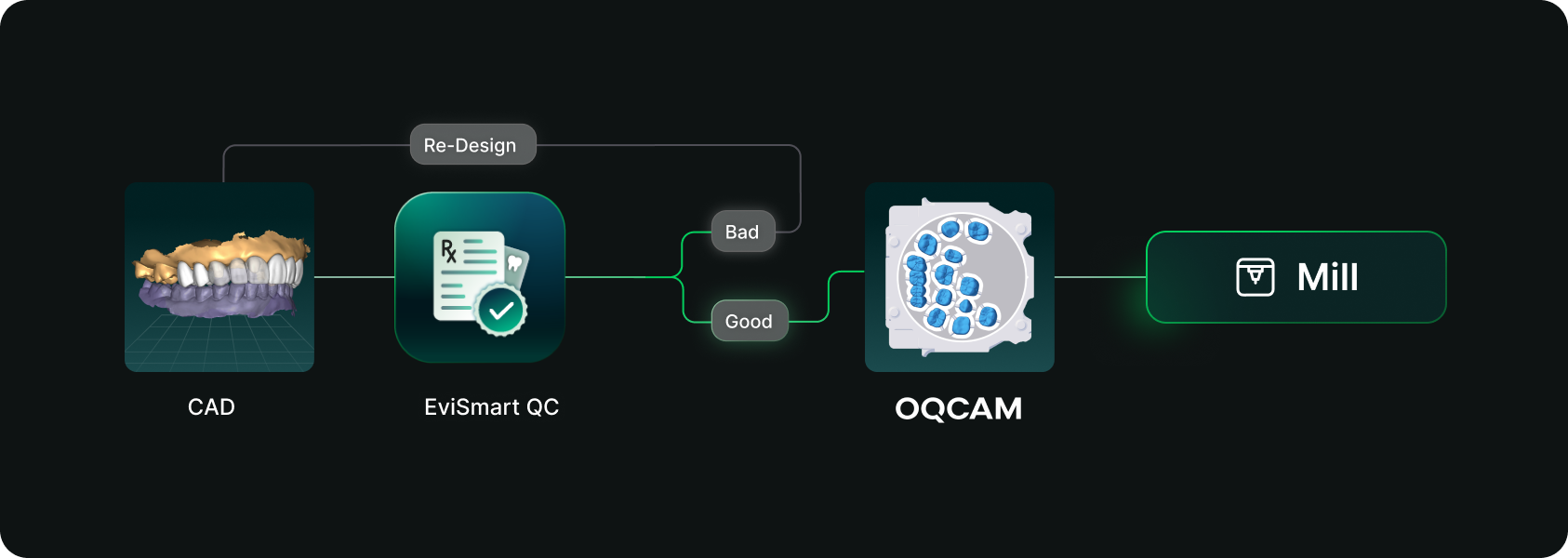
Designs you order from EviSmart arrive in your Oqcam already formatted. Named the way your nesting rules expect, with shade and material attached, and pointed at the machine that case belongs on.
The routing is decided per case. An implant case sends the crown to the mill and puck you cut implant crowns on, and the model to the printer you print models on. Different case types, different machines, chosen automatically rather than by a tech working through a dropdown for every file.
The trigger is QC approval. EviSmart designs your cases your way. The same team works on all your cases and learns what a good case looks like to you. Once your case passes our QC, it triggers a greenlight to send the design directly into your Oqcam account in under a minute.
Once the file arrives in your Oqcam, all your CAD/CAM technicians can review the nested design before starting the mill. That final QC step does not change and is not meant to.
Setup is one session. We connect your Oqcam account and agree where each of your products should go, using the routes and materials you have already built there. Nothing new to create, and you only revisit it if something changes.
Automatic sending only works if you trust what is being sent. Once a case is nested it gets cut, and a design that was not right is wasted material.
You choose what flows. During setup we map only the case types you want moving on their own. Anything unmapped never sends. It waits for you exactly as it does today.
Most labs start narrow. Bread and butter work first, night guards and posterior single units, then widen once they have watched it run for a few weeks. The lab that has been live longest started exactly there and has added case types since.
Your approval stays. This removes the file shuffling between design and CAM. It does not remove your eyes from the build.
For labs outsourcing design work the math gets compelling somewhere north of 30 cases a day into nesting, because that is where the handoff stops being an annoyance and starts being a role.
Not touchless design. Touchless handoff. Every step in that chain that requires judgment should keep requiring judgment, and every step that never did should stop requiring a person.
Nesting requires judgment. Confirming a build requires judgment. Renaming a file so software can read it does not, and never did. It was a workaround that quietly became somebody's job.
Nobody pays you to rename files.


